Hadoop MapReduce
This is a Hadoop data processing tool on top of HDFS
- it’s a batch query processing tool that goes over all available data
- best for off-line use
- it’s a part of Hadoop
MapReduce Jobs
Jobs
Job is a specification that should be run on the cluster by Hadoop/YARN
- it’s a unit of work
- contains: paths to input data, the MapReduce program (Map and Reduce UDFs) and configuration
- a job can have several input paths, and one output path
Job packaging:
- when we run the code on a cluster, we package it to a set of jar files
- we need to tell the cluster which is our jar
- done via
job.setJarByClass(MyJob.class), so Hadoop can figure out which jar to use - job is submitted via
job.waitForCompletion(true)
Data Locality Principle
- programs don’t pull data from storage
- instead, programs (jobs and tasks) are sent as close to data as possible
Tasks
Each job consists of tasks:
- there are two types of tasks: map tasks and reduce tasks
- tasks are scheduled by YARN and run on different nodes
- if a task fails, it’s rescheduled on a different node
Map tasks:
- the input files are split into fixed-size pieces - input splits
- then Hadoop creates a map task for each input split
- and then the task applies the map function to each record of that split
- map tasks write their results to local disks, not HDFS - their output is intermediate results and can be thrown away, when reducers are done
Reducer tasks:
- we specify the number of reducers for the job
- reducers cannot use the data locality principle, because input of Reducers is the output from all the mappers
- output of reducer is typically stored on hdfs
- it’s possible to have 0 reducers, then such a job is called “Map Only” and writes the output directly to HDFS
Users can set mappers, reducers and combiners
job.setMapperClass(MyMapper.class); job.setCombinerClass(MyCombiner.class); job.setReducerClass(MyReducer.class);
Map only tasks
job.setMapperClass(MyMapper.class); job.setNumReduceTasks(0);
MapReduce Job Execution
General flow:
- input files are split into input splits
- map phase: master picks some idle workers and assigns them a map task
- mappers write their results to their disks
- reduce phase: once they finish, reducers take the results and process
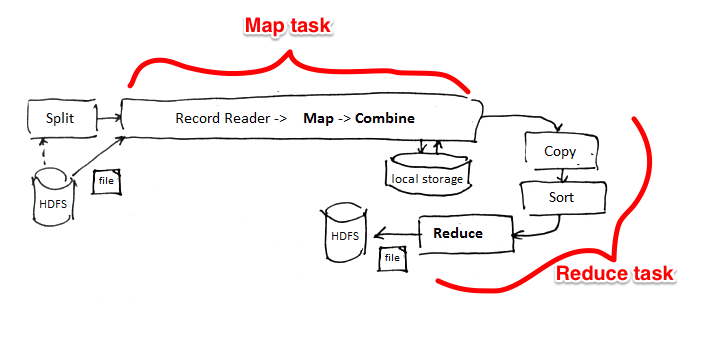
map phase
- each input split is assigned to a map worker
- it applies the map function to each record
- results are written to $R$ partitions, where $R$ is the number of reducers
- wait until all map tasks are completed
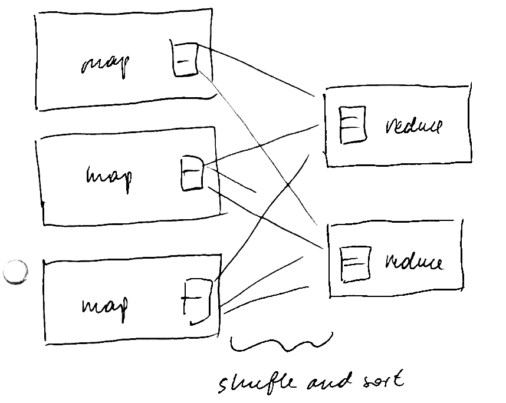
shuffle phase (sorting)
- the master assigns reduce task to workers
- the intermediate results are shuffled and assigned to reducers
- if there’s a combiner function, it is applied to each partition
- each reduces pulls its partition from mappers’ disks
- each record is assigned to only one reduces
 reduce phase
- Reducers ask the Application Master where the mappers are located
- and then they start pulling files from mappers as soon as mappers complete
- now apply the reduce function to each group
- output is typically stored on HDFS
Hadoop in one picture:
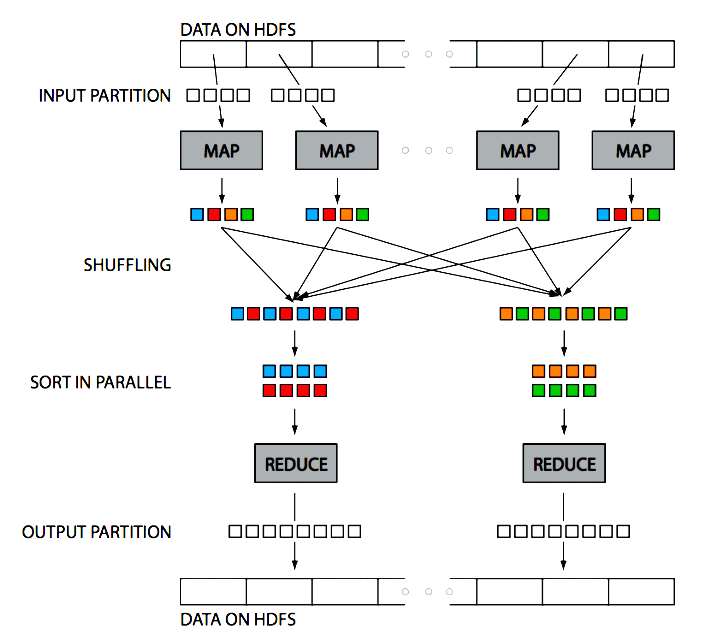
(Figure source: Huy Vo, NYU Poly and link)
Shuffling Details
- Hadoop is often referred as “Big Distributed Merge Sort”
- Hadoop guarantees that the that the input to reducers is sorted by key
- Shuffle is the process of sorting and transferring map output to the reducers
- The output of mappers is not just written to disk, Hadoop does some pre-sorting
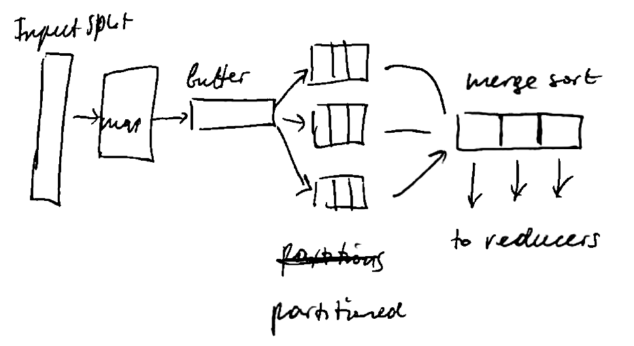
For tuning MapReduce jobs, it may be useful to know how the shuffling is performed
- Each mapper has ~100 mb buffer (buffer size is configured in
mapreduce.task.io.sort.mb) - when it’s 80% full (set in
mapreduce.map.sort.spill.percent), a background thread starts to spill the content on disk (while the buffers are still being populated) - it’s written to disk in the Round Robin fashion to
mapreduce.cluster.local.dirdirectory into a job-specific subdirectory - before writing to disk, the output is subdivided into partitions, and within each partition records are sorted by key
- if there’s a combiner function, it’s applied
- then all spills are merged
- if there are multiple spills (at least 3, specified in
mapreduce.map.combine.minspills), then combiner is run again - by default the output of mapper is not compressed, but you can turn it on with
mapreduce.map.output.compress=trueand the compression library is set withmapreduce.map.output.compress.codec - then each reducer can download its partition
Sorting at the Reducer side
- as soon as mappers complete, reducers start pulling the data from their local disks
- each reducer gets its own partitions and merge-sort them
- also, reducer is fed data at the last merge phase to save one iteration of merge sort
Runtime Scheduling Scheme
- see YARN for details how it’s scheduled
- For job execution MapReduce component doesn’t build any execution plan beforehand
- Result: no communication costs
- MR tasks are done without communication between tasks
Failures and Fault-Tolerance
There are different types of failures:
- Task Failure (e.g. task JVM crushed).
- It a task attempt fails, it’s rescheduled on a different node
- If the attempt fails 4 times (configured in
mapreduce.map| reduce.maxattempts), it’s not rescheduled
- Application Master failure
- Cluster Failure (not recoverable)
Fault tolerance is achieved naturally in this execution scheme
- detect failures and re-assigns tasks of failed nodes to others in the cluster
- also leads to (some) load balancing
Execution
The Tool Interface
Tool is a helper class for executing Hadoop MR jobs
- so you can implement the
Toolinterface and run it with theToolRunner - it knows where to look for config files and already parses some parameter
- e.g. if you pass
-confparameter, it knows that it needs to loadConfigurationfrom there - Usually you have something like YouJob extends Configured implements Tool {
Unit Testing
- MRUnit is a library for testing MapReduce jobs
- uses a mock job runner, collect the output and compares it with the expected output
Running Locally
- You can also run your files locally for testing, before submitting the job to a real cluster
- the default mode is local, and MR jobs are run with
LocalJobRunner - it runs on a single JVM and can be run from IDE
- The local mode is the default one:
mapreduce.framework.name=localby default - You can also have a local YARN cluster - see
MiniYARNCluster
Running on Cluster
Jobs must be packaged to jar files
- easiest way:
mvn clean package - or
mvn clean package -DskipTests
client - the driver class that submits the job, usually it implements the Tool interface
Client classpath:
- job jar
- jar files in the
lib/directory inside the jar - classpath defined by
HADOOP_CLASSPATH
Task classpath
- it runs on a separate JVM, not on the same as the client
- not controlled by
HADOOP_CLASSPATH- it’s only for the client - the job jar and its
lib/directory - files in the distributed cache (submitted via
-libjars)
Task classpath precedence
- for client:
HADOOP_USER_CLASSPATH_FIRST=true - for configuration:
mapreduce.job.user.classpath.first=true
Results:
part-r-0001(orpart-m-0001if job is map only)- you can merge the result
- just merge - see snippets
- order - see MapReduce Patters
Problem Decomposition
- Problems rarely can be expressed with a single MapReduce job
- usually need a few of them
Hadoop solution: JobControl class
- linear chain of jobs:
JobClient.runJob(conf1); JobClient.runJob(conf2);
- the job control creates a graph of jobs to be run on the cluster
- the jobs are submitted to the cluster specified in configuration
- but the
JobClientclass is run on the client machine
Other tools for running worflows
- Apache Oozie - for running workflows
- Luigi
Hadoop MapReduce Features
Compression
Output of reducers (and mappers) can be compressed
For example, to use GZip compression, use
TextOutputFormat.setCompressOutput(job, true); TextOutputFormat.setOutputCompressorClass(job, GzipCodec.class);
Hadoop can recognize gzipped files automatically when reading
Writables
Objects in Hadoop should implement the Writable interface
- by implementing it, you’re telling Hadoop how the files should be de-serialized
- the Java default serialization mechanism is not effective to be used in Hadoop
Writable interface has two methods:
void write(DataOutput out)void readFields(DataInput in)
Implementation is usually easy:
@Override public void write(DataOutput out) throws IOException { Text.writeString(out, language); Text.writeString(out, token); out.writeLong(hash); }
@Override public void readFields(DataInput in) throws IOException { language = Text.readString(in); token = Text.readString(in); hash = in.readLong(); }
WritableComparator
- is another interface to be used for keys
- it’s a
WritableandComparable - so there’s
int compareTo()method
RawComparator
- We also can have a raw comparator - to compare directly on bytes without depersonalization
- it’s very good for speed because it avoids serialization/de-serialization
- the method to implement is
int compare(byte[] b1, int s1, int l1, byte[] b2, int s2, int l2) WritableComparatoralready implements this method
Counters
Counters is a good way to count things
- for example, to count how many records are processed
- how mane records are processed with exceptions
Usage:
try { process(record, context); context.getCounter(Counters.DOCUMENTS).increment(1); } catch (Exception ex) { LOGGER.error(“Caught Exception”, ex); context.getCounter(Counters.EXCEPTIONS).increment(1); }
Secondary Sort
- Typically the output of mappers is sorted by key only - there’s no specific order for values
- Sometimes we need to make sure that the values are also sorted
- to do it, we create a custom
Writablethat is composed of both key and value - and use
NullWritableto output the value - See MapReduce/Secondary Sort
Distributed Cache
Distributed cache is a service for copying files to task nodes
Tool interface:
- If you implement the
Toolinterface, can specify files with the-filesoption - e.g.
-files some/path/to/file.txt - and then you can read this file from the working directory just with
new File("file.txt") - use the
setupmethod in mapper or reducer for this - these files are first copied to HDFS, and then pulled to local machines before the task is executed
In Java API you’d use this:
Job job = Job.getInstance(getConf()); job.addCacheFile(new URI(path.toUri() + “#symlink-name”));
- you can also specify a symlink name by appending
"#symlink-name" - then you can read the file with
FileUtils.openInputStream(new File(“./symlink-name”));
MapReduce vs RDBMS
- Declarative query language
- Schemas
- Indexing
- Logical Query Plan Optimization
- Caching
- View Materialization
- ACID and transactions
MapReduce
- High Scalability
- Fault-tolerance
Advantages
MapReduce is simple and expressive
- computing aggregation is easy
- flexible
- no dependency on Data Model or schema
- especially good for unstructured data
- cannot do that in Databases
- can write in any programming language
- fault-tolerance: detect failures and re-assigns tasks of failed nodes to others in the cluster
- high scalability
- even though not in the most efficient way
- cheap: runs on commodity hardware
- open source
Disadvantages
No Query Language
No high-level declarative language as SQL
- MapReduce is very low level - need to know programming languages
- programs are expensive to write and to maintain
- programmers that can do that are expensive
- for Data Warehousing: OLAP is not that good in MapReduce
Possible solutions:
Performance
Performance issues:
- no schema, no index, need to parse each input
- may cause performance degradation
- not tuned for multidimensional queries
- possible solutions: HBase, Hive
- because of fault-tolerance and scalability - it’s not always optimized for I/O cost
- all intermediate results are materialized (no Pipelining)
- triple replication
- low latency
- big overhead for small queries (job start time + jvm start time)
Map and Reduce are Blocking
- a transition from Map phase to Reduce phase cannot be made while Map tasks are still running
- reason for it is that relies on External Merge Sort for grouping intermediate results
- Pipelining is not possible
- latency problems from this blocking processing nature
- causes performance degradation - bad for on-line processing
Solutions for I/O optimization
- HBase
- Column-Oriented Database that has index structures
- data compression (easier for Column-Oriented Databases)
- Hadoop++ link
- HAIL (Hadoop Aggressive Indexing Library) as an enhancement for HDFS
- structured file format
- 20x improvement in Hadoop performance
- Spark and Flink can do pipelining
- Incremental MapReduce (like in CouchDB [link(http://stackoverflow.com/questions/11236676/why-is-mapreduce-in-couchdb-called-incremental]))
Sources
- Lee et al, Parallel Data Processing with MapReduce: A Survey link
- Ordonez et al, Relational versus non-relational database systems for data warehousing link
- Paper by Cloudera and Teradata, Awadallah and Graham, Hadoop and the Data Warehouse: When to Use Which. link
- Introduction to Data Science (coursera)
- Hadoop: The Definitive Guide (book)