Active Databases
In contrast to passive databases, in active databases, execution of actions can be triggered in response to some monitored events
- database updates and inserts
- points in time
- etc
Triggers
Usually there are some rules in such databases that react on the external events
Event - Condition - Action
- when an event occurs
- if a condition holds
- then an action is performed
Example
- event: customer has not paid 3 invoices at the due date
- condition: the credit limit is less than 20k euros
- cancel all current orders of this customer
Rule Triggers
These rules are usually expressed via triggers in databases
- a trigger may cause another trigger to fire rollback - abort the transaction that caused the triggered event
Applications
Rules usually express various aspects of application semantics and are typically used for maintaining Consistency (databases)
- static constrains
- referential integrity
- value constraints
- business rules
- historical data
- like all data about complete orders should be moved to a Data Warehouse
- Management of Derived Data
Management of Derived Data
An important application of triggers in Active Databases
This includes:
- materialized attributes
- materialized views
- replicated data
Derived Data:
- Views: a query on the database that can be used as a relation in other queries
- Derived attributes: values that are computed from other values
There are two strategies for derived data
- virtually supported - computed on demand (virtual tables)
- materialized - stored in a database and must be recomputed whenever the source data changes
Semantics
Triggers are usually a part of transaction
Levels of granularity
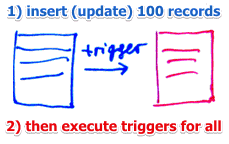
- statement-level
- executed once per statement
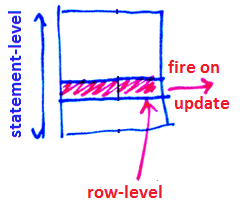
- row-level (or tuple-level)
- a rule is triggered line-by-line
Triggering types:
- Before triggers
- executed before the modification of a row
- in some databases (DB2) cannot modify the DB
- After triggers
- executed after the modification
- Instead-Of triggers
- when action on one table is replaced on different action
- typically used for managing derived data
Execution mode:
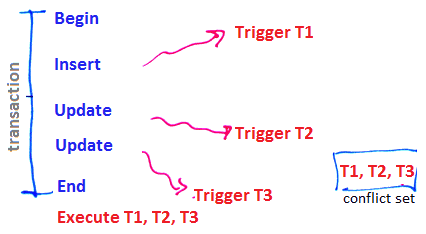
- deferred
- all triggered rules are put in a conflict set
- once a transaction finishes, the triggers are executed
- immediate
- just after the modification
Oracle
It supports
- both row-level and row-level
- both before triggers and after triggers
Rule processing algorithm
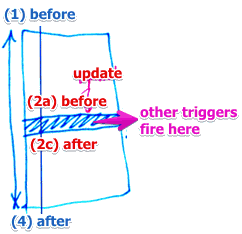
- execute the statement-level before triggers
- for each row affected by the triggering statement
- execute the row-level before triggers
- execute the modification of the row, check constraints and assertions
- execute the row-level after triggers
- perform statement-level assertion checking
- execute statement-level after trigger
- the modification may trigger another rules
- then the execution of the current statement is suspended
- the maximum number of active triggers in a chain is 32
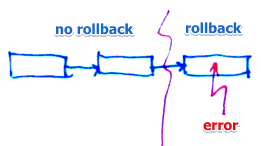
Partial rollback
- it’s possible to rollback only one statement instead of the whole transaction
MS SQL Server Triggers
The execution of triggers is immediate in MS SQL
- triggers are executed after an instruction (not after each row or each transaction)
Types:
- After: after the instruction takes place
- Instead Of: executes some custom code instead of the instruction
Syntax
CREATE TABLE <name>
ON <table>
{AFTER |  INSTEAD OF} <list of events> |as
<transact-SQL code>
Special tables that can be used inside triggers:
Inserted- new or updated rows of the triggered transactionDeleted- deleted rows (or rows with old state for updates) of the triggered transaction
Examples
Example 1
consider the following schema:
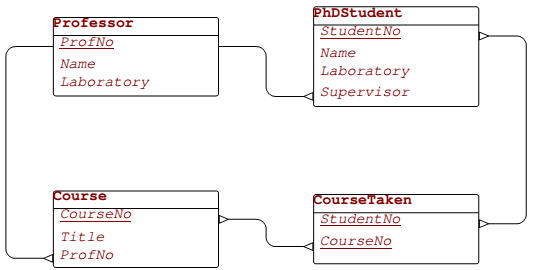
Constraint:
- PhD Students must work in the same laboratory as their supervisors
Events that may violate this constraint:
- (a) insert into
PhDStudent - (b) update of
LaboratoryorSupervisorinPhDStudent - (c) update of
LaboratoryinProfessor - (d) delete from
Professor
Events (a) and (b):
create trigger StudSameLabAsSuperv_PhDStud_InsUpd_Abort
-- EVENT
on PhDStudent
after insert, update
as
-- CONDITION
if exists (
     select * from Inserted I, Professor P
      where P.ProfNo = I.Supervisor
        -- and not the same laboratory
        and P.Laboratory <> I.Laboratory)
begin
-- ACTION
    raiserror 13000 'Constraint Violation:
              A PhD student must work in the same
              laboratory as his/her supervisor'
    rollback
end
Event (c)
create trigger StudSameLabAsSuperv_Prof_Upd_Abort
on Professor
after update
as
if exists (
    -- if there exists a student who is supervised
    -- by professor who works in different lab
    select * from Inserted I, PhDStudent S
     where I.ProfNo = S.Supervisor
       and I.Laboratory <> S.Laboratory)
begin
    raiserror 13000 'Constraint Violation:
              A PhD student must work in the same
              laboratory as his/her supervisor'
    rollback
end
Event (d)
- A DBMS system will not allow this if there’s a foreign key
Example 2
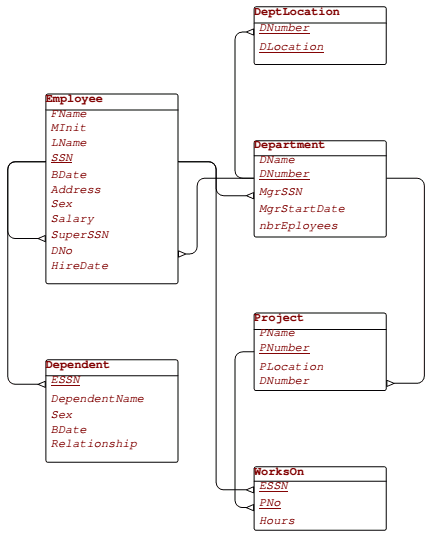
; The age of employees must be greater than 18
- this can be done with
CHECKconstraint
alter table Employee
add constraint employee_Age18
check (dateadd(year, 18, BDate) <= getdate())
; The attribute Department.NbrEmployees is derived from Employee.DNo
- can recalculate everything
- or update incrementally
create trigger DeptNbrEmp_Employee_InsUpdDel_Derive
on Employee
after insert, update, delete
as
begin
  update Department D
  set    NbrEmployees = (select Count(*)
                         from   Employee E
                         where  E.DNo = D.DNumber)
  where  D.DNumber in (select distinct I.DNo
                       from   Inserted I)
      or D.DNumber in (select distinct D.DNo
                       from   Deleted D)
end
Incremental version
create trigger derived_Department_NbrEmployees_Employee
on Employee
after insert, update, delete
as
begin
  update Department
  set  NbrEmployees = NbrEmployees
      + (select count(*) from Inserted I
         where  DNumber = I.DNo)
      - (select count(*) from Deleted D
         where  DNumber = D.DNo)
  where  DNumber in (select DNo from Inserted)
      or DNumber in (select DNo from Deleted)
end
Now also need to ensure that no one can modify this attribute
create trigger derived_Department_NbrEmployees_Department
on Department
after insert, update
as
if exists (select *
   from   Inserted
   where  NbrEmployees <>
     (select count(*) from  Employee E
      where E.DNo = DNumber))
begin
  raiserror 13008 'Constraint Violation:
        The attribute Department.NbrEmployees is a derived attribute from Employee.DNo'
  rollback
end